Bridging the gap between teaching and testing
You don’t often see close integration between a computerized test and a slide show; ‘10_Q’, however, has a great potential in this respect.
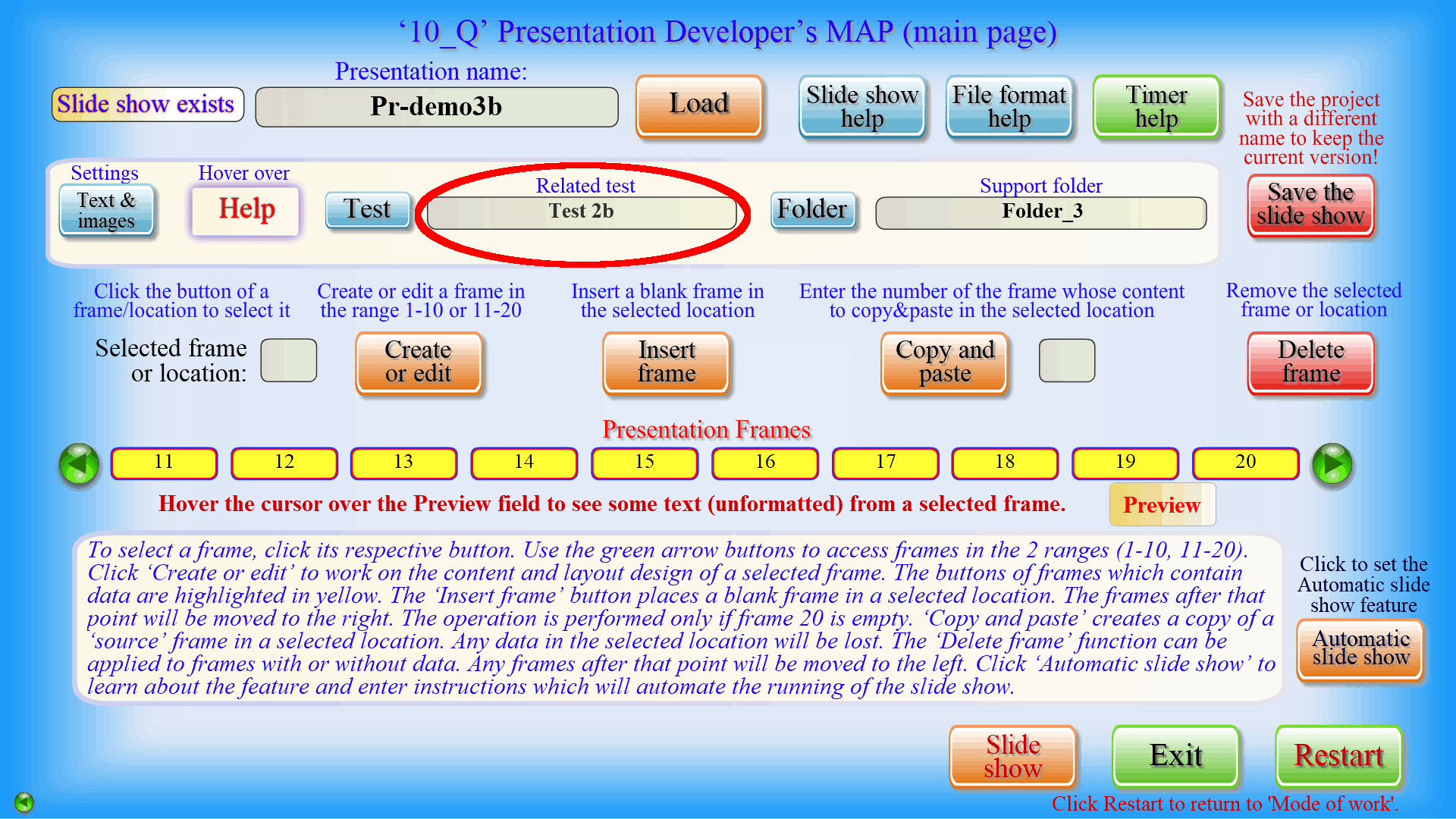
At specific points during a presentation, the emphasis may need to shift from providing information to obtaining feedback and checking the comprehension. With a click of a button, you could open an exercise from a related ‘10_Q’ test, and after completing it (with the active involvement of the audience, of course) and seeing the results, you can continue from where you left off.
The opposite is also easy to achieve. Students may be asked to watch a 10_Q presentation as an additional source of information while doing a test.
The 2 sample products included in the package – ‘Demo test’ and ‘Demo presentation’ (in 2 parts), can serve as an example of the integration discussed here: on the one hand, the presentation will help you to find the answers to some of the test questions; on the other hand, during the slide show you will be asked to take 2 ‘surprise’ quizzes, which are in fact exercises from the related ‘Demo test’. Related projects must share the same ‘support’ folder, which is actually a convenience for the developer.
The image on the left shows where you enter the name of the related test. Please find more information about related projects and ‘support’ folders in the Tutorials.